“sxgbxx”网站学习助手_第一版
某某某学习网站,每年需要完成一定学时,但工作繁忙,并不一定有时间来学习。本打算编写油猴脚本,但实在没有基础,所以最后采用python以并不优雅的方式来实现。
— —2023年10月3日更新— —
发现有同志编写了油猴脚本自动学习,我的方法已经不够简洁优雅了(如果需要无人监管+一次操作+多人数学习,我的程序仍然有优势),之后优先使用油猴脚本进行学习。油猴脚本地址
— —2023年8月1日更新— —
新增批量学习功能,通过selenium来操作浏览器,通过ddddocr解决登录验证码问题,需要确保selenium对应的浏览器为Edge浏览器。
新增加密功能,基于“电脑mac地址+当前月份+特定字符”进行编码,形成授权码。用户输入授权码和程序自计算出的授权码进行比对,以验证授权情况。
全部代码如下:
from selenium import webdriver
from selenium.webdriver.edge.service import Service as EdgeService
from webdriver_manager.microsoft import EdgeChromiumDriverManager
import os
import requests
from requests.exceptions import RequestException
import time
from lxml import etree
import pyautogui
import uuid
import datetime
import hashlib
from PIL import ImageGrab
import ddddocr
from PIL import Image
import cv2

def randomCode_ocr(randomCode_x1, randomCode_y1, randomCode_x2, randomCode_y2):  # 获取登录验证码
    randomCode_x1 = int(randomCode_x1)
    randomCode_y1 = int(randomCode_y1)
    randomCode_x2 = int(randomCode_x2)
    randomCode_y2 = int(randomCode_y2)
    bbox = (randomCode_x1, randomCode_y1, randomCode_x2, randomCode_y2)
    im = ImageGrab.grab(bbox)
    a = im.transpose(Image.ROTATE_90)
    a.save('as1.png')
    img = Image.open('as1.png')
    img = img.transpose(Image.ROTATE_270)  # 将图片旋转90度
    img.save("as1.png")
    ocr = ddddocr.DdddOcr()
    with open('as1.png', 'rb') as f:
        img_bytes = f.read()
    res = ocr.classification(img_bytes)
    os.remove('as1.png')
    return res

def open_new_tap(browser, url):  # 在已打开的浏览器中用新建标签页打开网址
    browser.get(url)
    # do something with the driver object

def get_mac_address():  # 获取本计算机的mac地址
    mac = uuid.UUID(int=uuid.getnode()).hex[-12:].upper()
    mac_address = "-".join([mac[e:e + 2] for e in range(0, 11, 2)])
    return mac_address

def encrypt_program():  # 对程序进行加密,返回系统计算出的授权码
    mac_address = get_mac_address()
    today = datetime.datetime.today()
    year = today.year
    month = today.month
    local_information = str(mac_address) + '-' + str(year) + '-' + str(month) + '-' + '2022年11月6日14:05:55'
    authorization_code = encrypt_method(local_information)
    return authorization_code

def encrypt_method(local_information):  # 加密方式
    md5 = hashlib.md5(local_information.encode()).hexdigest()
    sha1 = hashlib.sha1(md5.encode()).hexdigest()
    sha256 = hashlib.sha256(sha1.encode()).hexdigest()

    return sha256

def get_one_page(url):
    try:
        headers = {
            'User-Agent': 'Mozilla/5.0 (Windows NT 10.0; Win64; x64) AppleWebKit/537.36 (KHTML, like Gecko) Chrome/107.0.0.0 Safari/537.36 Edg/107.0.1418.26',
        }
        response = requests.get(url, headers=headers)
        if response.status_code == 200:
            return response.text
        return None
    except RequestException:
        return None

def make_new_lesson_codings(names):
    # 对原列表进行遍历
    for name in names:
        new_name = name[8: 24]
        # 把当前变量保存在新列表中
        new_names.append(new_name)

    return new_names  # 返回新列表

def make_lesson_urls(url, codes):
    for code in codes:
        genuine_url = url[0: 32] + 'playkpoint' + url[39: 56] + '?kpointId=' + code
        genuine_urls.append(genuine_url)

    return genuine_urls

def parse_one_page(html):
    # html.encoding = 'utf-8'
    selecter = etree.HTML(html)
    old_lesson_codings = selecter.xpath(
        '//*[@id="aCoursesList"]/div/div[2]/div/div[1]/div/div[2]/div[2]/div/ul/li/@onclick')
    lesson_codings = make_new_lesson_codings(old_lesson_codings)
    lesson_urls = make_lesson_urls(lessons_url, lesson_codings)
    lesson_types = selecter.xpath(
        '/html/body/div[1]/div[1]/div[4]/div/div[2]/div/div[1]/div/div[2]/div[2]/div/ul/li/div/a[2]/@title')
    lesson_times = selecter.xpath(
        '/html/body/div[1]/div[1]/div[4]/div/div[2]/div/div[1]/div/div[2]/div[2]/div/ul/li/div/a[2]/small/text()')
    return lesson_urls, lesson_types, lesson_times

def lesson_times_analyze(lesson_times):  # 获得每个课时所需要的时间,秒为单位
    for lesson_time in lesson_times:
        if lesson_time[1].isdigit():
            if lesson_time[2].isdigit():
                lesson_time_minute = lesson_time[0:3]
            else:
                lesson_time_minute = lesson_time[0:2]
        else:
            lesson_time_minute = lesson_time[0]

        lesson_time_second = (int(lesson_time_minute) + int(2)) * int(60)
        lesson_time_seconds.append(lesson_time_second)
    return lesson_time_seconds

def main(browser,url, play_button_coordinate_x, play_button_coordinate_y, photo_button_coordinate_x, photo_button_coordinate_y):
    print('开始学习课程:' + url)
    html = get_one_page(url)
    lesson_sourse = parse_one_page(html)
    lesson_urls = lesson_sourse[0]
    lesson_types = lesson_sourse[1]
    lesson_times = lesson_times_analyze(lesson_sourse[2])
    lesson_quantity = len(lesson_urls)  # 获取课时数量
    for i in range(0, lesson_quantity):
        open_new_tap(browser,lesson_urls[i])
        time.sleep(10)
        if lesson_types[i] == '视频播放':
            pyautogui.moveTo(int(play_button_coordinate_x), int(play_button_coordinate_y), duration=1)
            time.sleep(1)
            pyautogui.click()
            time.sleep(lesson_times[i])
            # 选择点击播放按钮
            # 选择sleep lesson_times[i]
        else:
            pyautogui.moveTo(int(photo_button_coordinate_x), int(photo_button_coordinate_y), duration=1)
            pyautogui.scroll(-9999999)
            time.sleep(5)

        time.sleep(4)
        print('已经学完第' + str(int(i) + int(1)) + '课时')
    print('本课程已经学完')

if __name__ == '__main__':
    test_first = input("这是测试信息")
    print('你的本机mac地址为:' + get_mac_address())
    user_authorization_code = input('请输入授权码,可告知向开发者mac地址,询问授权码:')
    if user_authorization_code == encrypt_program():
        print('授权码正确,可以继续使用。为更好运行程序,请学习时不要操作电脑。')

        # 查看浏览器坐标信息
        print('请在打开的浏览器中查看验证码区域坐标,并手动登录,查看播放按钮和图文滚动坐标,并进行记录。')
        print('记录完成后,打开本程序窗口,输入任意数字,进行下一步:')
        time.sleep(10)

        test_browser = browser = webdriver.Edge(executable_path='msedgedriver.exe')
        test_browser.maximize_window()
        test_browser.get('<https://www.sxgbxx.gov.cn/login>')
        test_browser_canshu = input('请输入任意内容并回车,进行下一步操作。')
        test_browser.quit()
        time.sleep(3)

        # 输入所有初始信息
        randomCode_x1 = input('请输入验证码左上角的x坐标:')
        randomCode_y1 = input('请输入验证码左上角的y坐标:')
        randomCode_x2 = input('请输入验证码右下角的x坐标:')
        randomCode_y2 = input('请输入验证码右下角的y坐标:')
        play_button_coordinate_x = input('请输入播放按钮x坐标:')
        play_button_coordinate_y = input('请输入播放按钮y坐标:')
        photo_button_coordinate_x = input('请输入图文课程滚动x坐标:')
        photo_button_coordinate_y = input('请输入图文课程滚动x坐标:')

        usernames_list = input('输入需要学习的账户名,空格隔开:')
        passwords_list = input('请输对应账户的密码,空格隔开:')
        lessons_urls_list = input('请输入课程网址,多个课程之间空格隔开:')
        usernames = usernames_list.split(' ')
        passwords = passwords_list.split(' ')
        lessons_urls = lessons_urls_list.split(' ')
        usernames_number = range(len(usernames))  # 查看有几个账号

        # 开始一个账户的学习
        for i in usernames_number:
            username = usernames[i]
            password = passwords[i]

            browser = webdriver.Edge(executable_path='msedgedriver.exe')
            browser.maximize_window()
            browser.get('<https://www.sxgbxx.gov.cn/login>')
            time.sleep(3)

            code = randomCode_ocr(randomCode_x1, randomCode_y1, randomCode_x2, randomCode_y2)
            print(code)

            # 定位用户名和密码输入框,并输入相应的信息
            browser.find_element_by_xpath('//*[@id="userEmail"]').send_keys(username)
            browser.find_element_by_xpath('//*[@id="userPassword"]').send_keys(password)
            browser.find_element_by_xpath('//*[@id="randomCode"]').send_keys(code)
            time.sleep(2)
            browser.find_element_by_xpath(
                '/html/body/div[1]/div[1]/div[4]/section/div/article/section/section/div[2]/a').click()
            time.sleep(3)

            for lessons_url in lessons_urls:
                new_names = []
                genuine_urls = []
                lesson_time_seconds = []
                main(browser, lessons_url, play_button_coordinate_x, play_button_coordinate_y,
                     photo_button_coordinate_x, photo_button_coordinate_y)

            print('账户' + username + '所有课程以学习完成')
            time.sleep(2)
            browser.close()
            time.sleep(4)

        print('所有账户学习完毕')

    else:
        print('授权码不正确或授权码到期,授权码请询问开发者。')

    input('程序已经运行完毕,可以关闭了!')
— —2022年11月11日初稿— —
分析网站
某一个课程网址为:https://www.aaaa.gov.cn/front/couinfo/63a4a3367b3fd385
其课程下的课时1网址为:https://www.aaaa.gov.cn/front/playkpoint/63a4a3367b3fd385?kpointId=7087cdf755b8a512
其课程下的课时2网址为:https://www.aaaa.gov.cn/front/playkpoint/63a4a3367b3fd385?kpointId=27dd14a74122e5d2
可以看到课程链接后的字符63a4a3367b3fd385代表一个课程,课程下的课时为https://www.aaaa.gov.cn/front/playkpoint/+课程编码+?kpointId=+每个课时的编码。所以只要能够获取到每个课时的编码,就能得到课程下所有课时的链接。
使用浏览器检查工具,我们可以看到每一个课时对应的编码、课时类型、课时时长。
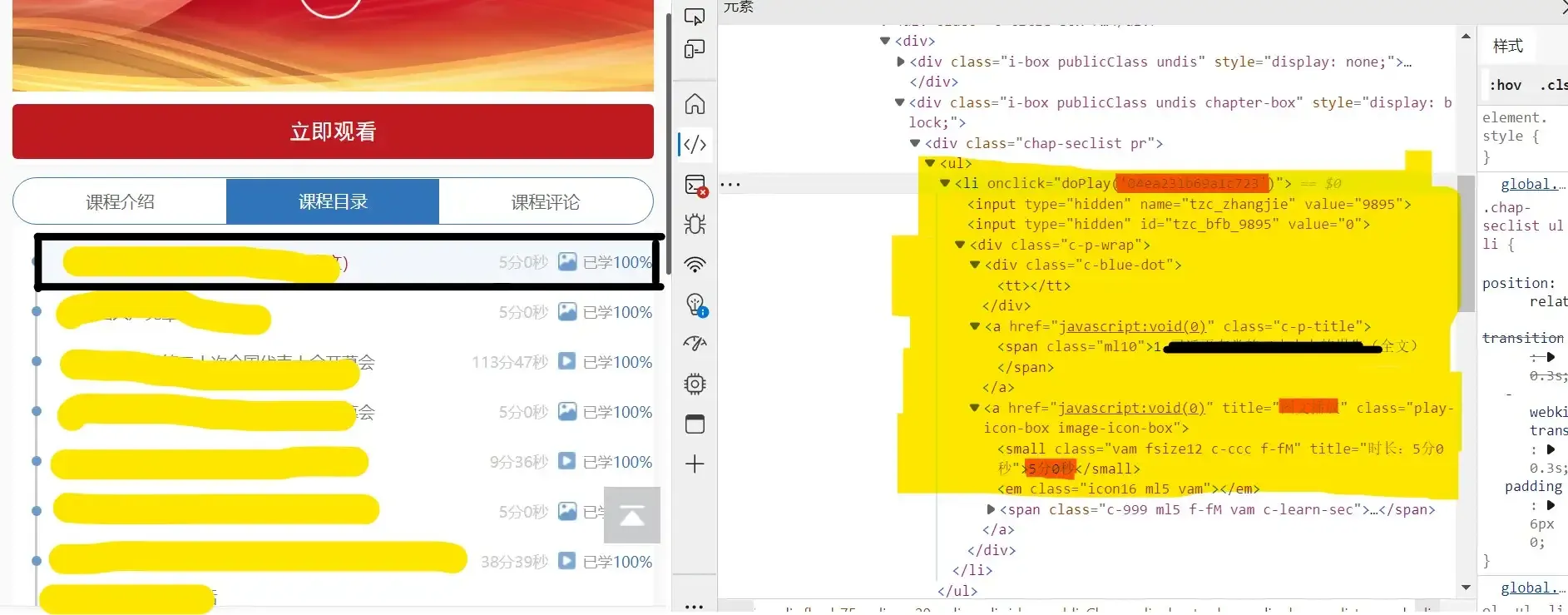
分析到这,我们就可以想办法得到课程所有课时的链接、类型和时长。就可以用程序先获取以上信息,再依次打开课时链接,判断课时类型和时长,对每个课时页面进行_点按播放按钮或滚动查看_,以此来实现自动学习。
程序实现
爬取课程页面到本地
def get_one_page(url):
    try:
        headers = {
            'User-Agent': 'Mozilla/5.0 (Windows NT 10.0; Win64; x64) AppleWebKit/537.36 (KHTML, like Gecko) Chrome/107.0.0.0 Safari/537.36 Edg/107.0.1418.26',
        }
        response = requests.get(url, headers=headers)
        if response.status_code == 200:
            return response.text
        return None
    except RequestException:
        return None
解析爬取下的页面
利用xpath方式获取到每个课时的相关信息,返回信息列表。(正则表达式也可以实现)
def make_lesson_urls(url,codes): # 将页面的课时编码进行处理,生成每个课时的链接,返回为列表
    for code in codes:
        genuine_url = url[0: 32] + 'playkpoint' + url[39: 56] + '?kpointId=' + code
        genuine_urls.append(genuine_url)

    return genuine_urls

def parse_one_page(html): #解析页面
    #html.encoding = 'utf-8'
    selecter = etree.HTML(html)
    old_lesson_codings = selecter.xpath('//*[@id="aCoursesList"]/div/div[2]/div/div[1]/div/div[2]/div[2]/div/ul/li/@onclick')
    lesson_codings = make_new_lesson_codings(old_lesson_codings)
    lesson_urls = make_lesson_urls(url,lesson_codings)
    lesson_types = selecter.xpath('/html/body/div[1]/div[1]/div[4]/div/div[2]/div/div[1]/div/div[2]/div[2]/div/ul/li/div/a[2]/@title')
    lesson_times = selecter.xpath('/html/body/div[1]/div[1]/div[4]/div/div[2]/div/div[1]/div/div[2]/div[2]/div/ul/li/div/a[2]/small/text()')
    return lesson_urls,lesson_types,lesson_times
判断课时时长
将解析到的时长某某分某某秒转换为某某秒,并进行一定延长,作为后面程序等待视频播放完成的依据。
def lesson_times_analyze(lesson_times):  #获得每个课时所需要的时间,秒为单位
    for lesson_time in lesson_times:
        if lesson_time[1].isdigit():
            lesson_time_minute = lesson_time[0:2]
        else:
            lesson_time_minute = lesson_time[0]

        lesson_time_second = (int(lesson_time_minute) + int(1)) * int(60)
        lesson_time_seconds.append(lesson_time_second)
    return lesson_time_seconds
操作浏览器打开课时网页
使用指定浏览器打开课时页面,需要填入指定浏览器的程序地址。
def browser_operation(url):  #使用默认浏览器打开
    webbrowser.open(url)
获取播放按钮位置坐标
通过一下程序,获取播放按钮的位置坐标,和图文滚动的合适位置坐标。记录下来,放在程序中以便进行点击操作和滚动操作。
import os
import time
import pyautogui as pag

try:
    while True:
        print("Press Ctrl-C to end")
        screenWidth, screenHeight = pag.size()  # 获取屏幕的尺寸
        x, y = pag.position()  # 返回鼠标的坐标
        print("Screen size: (%s %s),  Position : (%s, %s)\\\\n" % (screenWidth, screenHeight, x, y))  # 打印坐标

        time.sleep(1)  # 每个1s中打印一次 , 并执行清屏
        os.system('cls')  # 执行系统清屏指令
except KeyboardInterrupt:
    print('end')
鼠标操作方法
鼠标操作使用了pyautogui,此方法可以实现鼠标的移动、点击、滚动和键盘的快捷键输入等。
移动:pyautogui.moveTo(x坐标, y坐标, duration=1)
左键单击:pyautogui.click()
中键滚动:pyautogui.scroll(-9999999)正值为向上,负值为向下,数值为滚动单位单位
快捷键输入:pyautogui.hotkey('ctrl', 'w') ctrl+w是关闭标签页的快捷键
主程序
主程序中,输入时,可以输入多个课程链接,方便一次性学习多个课程。
def main(url,play_button_coordinate_x,play_button_coordinate_y,photo_button_coordinate_x,photo_button_coordinate_y):

    print('开始学习课程:' + url)
    html = get_one_page(url)
    lesson_sourse = parse_one_page(html)
    lesson_urls = lesson_sourse[0]
    lesson_types = lesson_sourse[1]
    lesson_times = lesson_times_analyze(lesson_sourse[2])
    lesson_quantity = len(lesson_urls)  #获取课时数量,作为之后遍历次数的依据
    for i in range(0, lesson_quantity):  #在课时数量范围内进行课时的遍历
        browser_operation(lesson_urls[i])
        time.sleep(10)
        if lesson_types[i] == '视频播放':
            pyautogui.moveTo(int(play_button_coordinate_x), int(play_button_coordinate_y), duration=1)
            pyautogui.click()
            time.sleep(lesson_times[i])
        else:
            pyautogui.moveTo(int(photo_button_coordinate_x), int(photo_button_coordinate_y), duration=1)
            pyautogui.scroll(-9999999)  # 选择向下滚动9999999个单位操作
            time.sleep(5)  # 选择合适的睡眠时间,5s就可以了
        # 关闭浏览器
        pyautogui.hotkey('ctrl', 'w')
        time.sleep(4)

        print('已经学完第' + str(int(i) + int(1)) + '课时')

    print('本课程已经学完')
全部程序
import requests
from requests.exceptions import RequestException
import time
from lxml import etree
import webbrowser
import pyautogui

def get_one_page(url):
    try:
        headers = {
            'User-Agent': 'Mozilla/5.0 (Windows NT 10.0; Win64; x64) AppleWebKit/537.36 (KHTML, like Gecko) Chrome/107.0.0.0 Safari/537.36 Edg/107.0.1418.26',
        }
        response = requests.get(url, headers=headers)
        if response.status_code == 200:
            return response.text
        return None
    except RequestException:
        return None

def make_new_lesson_codings(names):
    # 对原列表进行遍历
    for name in names:
        new_name = name[8: 24]
        # 把当前变量保存在新列表中
        new_names.append(new_name)

    return new_names  # 返回新列表

def make_lesson_urls(url,codes):
    for code in codes:
        genuine_url = url[0: 32] + 'playkpoint' + url[39: 56] + '?kpointId=' + code
        genuine_urls.append(genuine_url)

    return genuine_urls

def parse_one_page(html):
    #html.encoding = 'utf-8'
    selecter = etree.HTML(html)
    old_lesson_codings = selecter.xpath('//*[@id="aCoursesList"]/div/div[2]/div/div[1]/div/div[2]/div[2]/div/ul/li/@onclick')
    lesson_codings = make_new_lesson_codings(old_lesson_codings)
    lesson_urls = make_lesson_urls(url,lesson_codings)
    lesson_types = selecter.xpath('/html/body/div[1]/div[1]/div[4]/div/div[2]/div/div[1]/div/div[2]/div[2]/div/ul/li/div/a[2]/@title')
    lesson_times = selecter.xpath('/html/body/div[1]/div[1]/div[4]/div/div[2]/div/div[1]/div/div[2]/div[2]/div/ul/li/div/a[2]/small/text()')
    return lesson_urls,lesson_types,lesson_times

def lesson_times_analyze(lesson_times):  #获得每个课时所需要的时间,秒为单位
    for lesson_time in lesson_times:
        if lesson_time[1].isdigit():
            lesson_time_minute = lesson_time[0:2]
        else:
            lesson_time_minute = lesson_time[0]

        lesson_time_second = (int(lesson_time_minute) + int(1)) * int(60)
        lesson_time_seconds.append(lesson_time_second)
    return lesson_time_seconds

def browser_operation(url):
    webbrowser.open(url)

if __name__ == '__main__':
    '''
    new_names = []
    genuine_urls = []
    lesson_time_seconds = []
    '''

    url_list = input('请输入课程网址,多个课程之间空格隔开:')
    urls = url_list.split(" ")
    for url in urls:
        new_names = []
        genuine_urls = []
        lesson_time_seconds = []
        print('开始学习课程:' + url)
        html = get_one_page(url)
        lesson_sourse = parse_one_page(html)
        lesson_urls = lesson_sourse[0]
        lesson_types = lesson_sourse[1]
        lesson_times = lesson_times_analyze(lesson_sourse[2])
        lesson_quantity = len(lesson_urls)  # 获取课时数量
        for i in range(0, lesson_quantity):
            browser_operation(lesson_urls[i])
            time.sleep(10)
            if lesson_types[i] == '视频播放':
                pyautogui.moveTo(100, 924, duration=1)
                time.sleep(1)
                pyautogui.click()
                time.sleep(lesson_times[i])
            else:
                pyautogui.moveTo(772, 536, duration=1)
                pyautogui.scroll(-9999999)
                time.sleep(5)

            pyautogui.hotkey('ctrl', 'w')  #通过快捷键关闭标签页
            time.sleep(4)

            print('已经学完第' + str(int(i) + int(1)) + '课时')

        print('本课程已经学完')
    print('所有课程以学习完成')
注意事项
- 本程序只能一个课程一个课程学习,所以需要手动输入多个课程链接
- 使用前,需使用默认浏览器打开并登录学习网站,最小化浏览器即可
- 需提前使用位置坐标工具,获取播放按钮和鼠标滚动区域的坐标
- 程序运行后,最好不要在用电脑,这样效果最佳。使用后有可能出现小瑕疵
后记
这个需求,油猴脚本才是最优解,但我对JAVA了解为零,只能用python这样来实现。缺点在于很原始粗糙的采用了模拟键鼠点按等操作,导致电脑不能干其他事情。
以上程序是我半琢磨办实验出来的,结构、效率上都不够好,不过自用是足够了。(大佬勿喷)
之后我会尝试完善并打包成exe可执行文件,使其更具用通用型,让他人只填写个别信息就可以使用,到时候也会加入授权机制,防止程序不良失控传播,导致出现不好好学习的不良风气。当然,这个程序及其源代码仅供学习交流使用,还是要认真好好学习的。